
Gridlock LogoGridlock Logo

Season 1 — Coming Soon

READY TO
DROP IN?

Sign up now, link your Minecraft account, find your duo, and prepare for the ultimate 2v2 bingo showdown.

EG Icon
Gridlock Logo

The next step in competitive Minecraft. 2v2 lockout bingo, custom maps, $45K prize pool.

Gridlock
  • How to Play
  • Event Format
  • Prize Pool
  • FAQ
  • Branding
  • Merch
Resources
  • Wiki
  • Credits
  • Accessibility
  • Participation Agreement
  • Privacy Policy
  • Terms of Service
Socials
Join Gridlock Discord
Evil Geniuses Logo
© 2026 Gridlock. Not affiliated with Mojang or Microsoft.Developed & designed by chezzer
Gridlock LogoGridlock Logo
Gridlock Wiki
Gridlock Wiki
Join Discord ServerFollow us on XWelcome to the Gridlock Wiki!Frequently Asked Questions
Gameplay
Game FlowThe MapThe BoardCombatScoringChanges
Tournament
Register for GridlockScheduleFormatRules
Dashboard
Creating your accountCompleting setupAge verificationThe dashboard home page
Editing your profileLinking your Minecraft accountConnected accountsManaging your sessionsDeleting your account
Resources
ObjectivesBoard GeneratorMap Download
Back to Home
DashboardYour Account

Deleting your account

Permanently delete your Gridlock account and all associated data.

It is possible to remove all personal data associated with your Gridlock account yourself. This may be because you are no longer participating in Gridlock, or you want to delete your account for other reasons.

How to delete your account

To delete your account, follow these easy steps:

  1. Make sure you're logged in to your account.
  2. Open your Account Settings by clicking on the item in the sidebar, or head here.
  3. Scroll down to the bottom of the Profile section.
  4. Click the Delete Account button.
  5. Confirm that you want to delete your account.
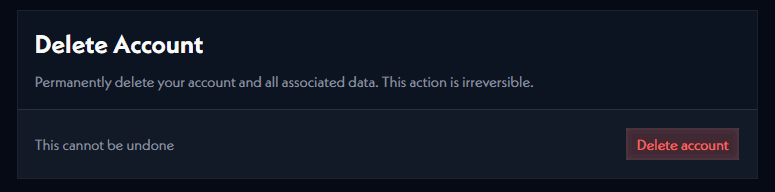
deleting your account

Your account will be permanently deleted and all associated data will be removed from our database. You will no longer be able to log in to your account.

A few things to keep in mind

  • Your account deletion will notify us and we will reach out if the account deletion is unexpected.
  • All duos you have formed will be disbanded.
  • Match history will not be deleted, but it will be anonymized.
  • All player data will be deleted, however, reports, bans and warnings will remain against your Minecraft Account.

Managing your sessions

Review where you're signed in and sign out of devices you don't recognise.

Forming a duo

Instructions on how to form a duo with another player.

On this page

How to delete your accountA few things to keep in mind