Gridlock LogoGridlock Logo

Season 1 — Coming Soon

READY TO
DROP IN?

Sign up now, link your Minecraft account, find your duo, and prepare for the ultimate 2v2 bingo showdown.

EG Icon
Gridlock Logo

The next step in competitive Minecraft. 2v2 lockout bingo, custom maps, $45K prize pool.

Gridlock
  • How to Play
  • Event Format
  • Prize Pool
  • FAQ
  • Branding
  • Merch
Resources
  • Wiki
  • Credits
  • Accessibility
  • Participation Agreement
  • Privacy Policy
  • Terms of Service
Socials
Join Gridlock Discord
Evil Geniuses Logo
© 2026 Gridlock. Not affiliated with Mojang or Microsoft.Developed & designed by chezzer
Gridlock LogoGridlock Logo
Gridlock Wiki
Gridlock Wiki
Join Discord ServerFollow us on XWelcome to the Gridlock Wiki!Frequently Asked Questions
Gameplay
Game FlowThe MapThe BoardCombatScoringChanges
Tournament
Register for GridlockScheduleFormatRules
Dashboard
Creating your accountCompleting setupAge verificationThe dashboard home page
Resources
ObjectivesBoard GeneratorMap Download
Back to Home
DashboardGetting Started

Creating your account

How to sign up for Gridlock using Discord and other login options.

To participate in Gridlock, you need to sign up via our website first and give us some information about yourself. This is a one-time process that will guide you through the steps.

To create your account, you can signup on our login page by clicking Login with Discord. This will take you to a Discord login page.
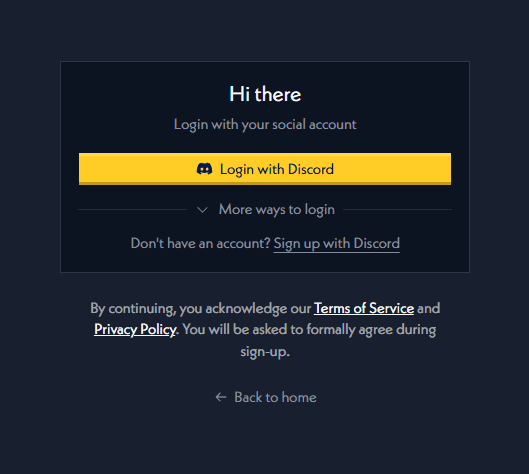
login with discord

If you are already logged in, you'll be taken directly to the dashboard.

Using different login methods

You can also signup or login using Twitch or YouTube if you don't have your Discord account handy, you can do this by expanding the More ways to login section.

Dashboard

All you need to know about the Gridlock Dashboard

Completing setup

Walk through the onboarding checklist to unlock your dashboard.

On this page

Using different login methods